
UDOO: Arduion Linux Android TOGETHER!!
Friday, 2 May 2014
 All in One

Android device, Powerful computer, Arduino-compatible
UDOO is a multi development platform solution for Android, Linux, Arduino and Google ADK 2012.
 UDOO allows you to switch between Linux and Android in a few seconds,
simply by replacing the Micro SD card and rebooting the system. UDOO is a stand alone computer itself and since is based on the
Freescale i.MX 6 CPU, it runs an optimized version of Linux Ubuntu for
ARM architecture, called Linaro (11.10 at the moment). Linaro
environment has everything you need for programming, for example you can
use the Arduino IDE to build & upload your sketches to the
Arduino-compatible embedded board, without additional/external cable
connections.
UDOO allows you to switch between Linux and Android in a few seconds,
simply by replacing the Micro SD card and rebooting the system. UDOO is a stand alone computer itself and since is based on the
Freescale i.MX 6 CPU, it runs an optimized version of Linux Ubuntu for
ARM architecture, called Linaro (11.10 at the moment). Linaro
environment has everything you need for programming, for example you can
use the Arduino IDE to build & upload your sketches to the
Arduino-compatible embedded board, without additional/external cable
connections.
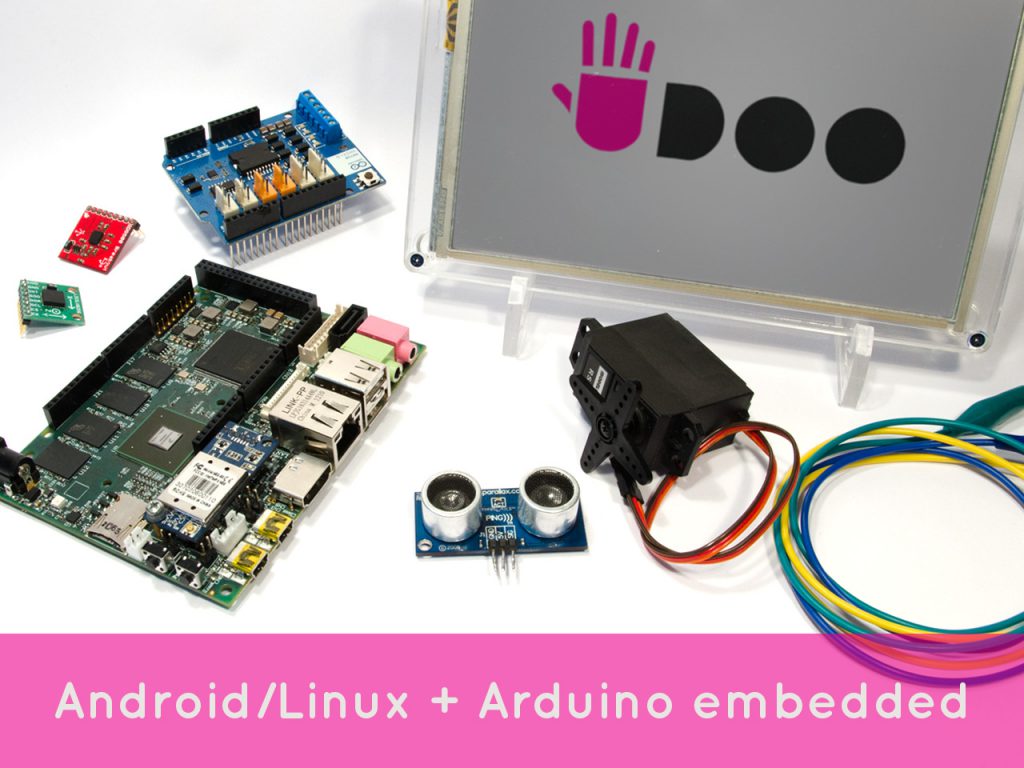
Android 4.2.2 Jelly Bean runs smootly on UDOO giving you all the features of an Android device. And UDOO is compatible with all the sketches, tutorials and resources available on the Arduino community as well as all the shields, sensors and actuators for Arduino DUE available on the market.
Features
- CPU Freescale i.MX 6 ARM Cortex-A9 Quad core 1GHz
- GPU Vivante GC 2000 + Vivante GC 355 + Vivante GC 320
- Integrated accelerators for 2D, OpenGL® ES2.0 3D and OpenVG™
- Atmel SAM3X8E ARM Cortex-M3 CPU (same as Arduino Due)
- RAM DDR3 1GB
- 76 fully available GPIO: 62 digital + 14 digital/analog
- Arduino-compatible R3 1.0 pinout
- HDMI and LVDS + Touch
- 2 Micro USB (1 OTG type a+b)
- 2 USB type A (x2) and 1 USB connector (requires a specific wire)
- Analog Audio and Mic
- CSI Camera Connection
- on board Micro SD card reader (boot device)
- Power Supply (6-15V) and External Battery connector
- Ethernet RJ45 (10/100/1000 MBit)
- WiFi Module
- SATA
Digispark Pro! Tiny spark in Arduino creating Fire??
Saturday, 19 April 2014
The tiny Arduino IDE ready, usb and mobile dev board
and ecosystem - cheap enough to leave in any project! Wi-fi, BLE, and
25+ shields!

Serial over USB debugging, USB programmable, 14 i/o, SPI,
I2C, UART, USB Device Emulation, Mobile Development Ready, Optional BT,
BLE, Mesh, and Wi-Fi.
The super small, dirt cheap,
always open source, Arduino compatible, USB (and Mobile and Wireless!)
development (and production) platform, and follow-up to the original
Digispark.
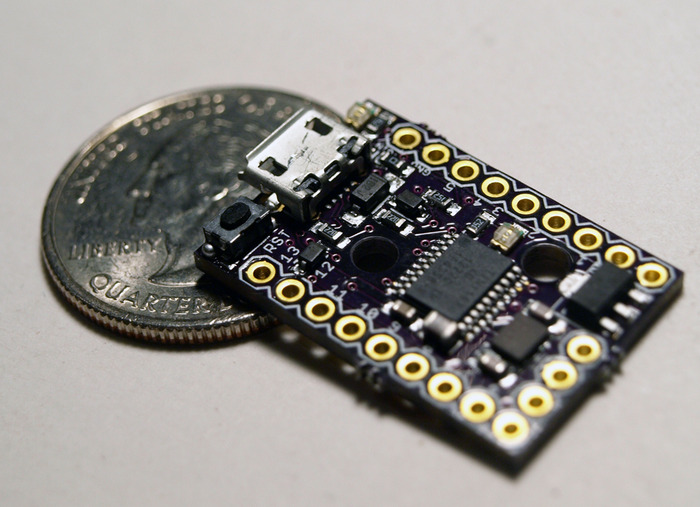 Easier to use, more pins, more program
space, more features, more reliable - supporting the entire existing
Digispark ecosystem of 25+ shields and adding Wi-Fi, Bluetooth, BLE
shields and more! Ready for all your projects - including mobile
hardware development! All still super affordable!
Easier to use, more pins, more program
space, more features, more reliable - supporting the entire existing
Digispark ecosystem of 25+ shields and adding Wi-Fi, Bluetooth, BLE
shields and more! Ready for all your projects - including mobile
hardware development! All still super affordable!
The
Digispark Pro Ecosystem is the cheapest, Arduino compatible development
platform for Mobile and Wireless hardware development.

- Compatible with Arduino IDE 1.5 (OSX/Win/Linux)
- Fully signed drivers and executable for easy installation
- USB programming, USB device emulation, USB-CDC virtual serial port emulation
- 16 Mhz AVR MCU - using a true 16Mhz precision crystal
- 16KB Flash Memory (14.5K+ after bootloader)
- Serial over USB debugging and communication!
- 14 i/o Pins (2 shared with USB)
- I2C, true SPI, UART, LIN, and USI
- ADC on 10 pins
- 3 PWM Channels (which can be assigned to a selection of pins)
- Power via USB, or External Source - 5v or 6-16v (automatic selection)
- On-board button that can be used as a reset, program, or user button - or can be disabled to use that pin as general i/o - without changing the bootloader
- On-board 500ma 5V regulator
- Power LED and Test/Status LED (on Pin 1)
- User accessible solder jumpers to disable LEDs, and other features for lower power consumption
- Two mounting holes.
- Breadboard compatible pin out/spacing (the three side header pins are only for legacy shield support).


Wi-Fi, Bluetooth, BLE, Mesh shields: The Digispark Pro is
backwards compatible with all existing Digispark shields - and it has
some shields exclusive for the Pro including: a Wi-Fi shield, a
Bluetooth Classic shield, a Bluetooth 4.0/Low Energy Shield, and a
nRF24L01+ low cost mesh networking shield. These low cost shields
make the Digispark Pro the cheapest way to jump into Internet of Things,
Mobile, and Wireless development!
What is digital datapath?
Saturday, 19 April 2014
A datapath is a collection of functional units, such as arithmetic logic units or multipliers, that perform data processing operations.
Datapath elements include adders, multipliers, shifters, BFUs, etc.
Read more ...
Datapath elements include adders, multipliers, shifters, BFUs, etc.
- The speed of these elements often dominates the overall system performance so optimization techniques are important.
Minnowboard Max "AN OPEN SOURCE SINGLE BOARD COMPUTER"
Friday, 18 April 2014
 Not to be outflanked by rivals, Intel has released the $99
Minnowboard Max, a tiny single-board computer that runs Linux and
Android. It is completely open source – you can check out the firmware and software here – and runs a 1.91GHz Atom E3845 processor.
Not to be outflanked by rivals, Intel has released the $99
Minnowboard Max, a tiny single-board computer that runs Linux and
Android. It is completely open source – you can check out the firmware and software here – and runs a 1.91GHz Atom E3845 processor.
The board’s schematics are also available for download and the Intel
graphics chipset has open-source drivers so hackers can have their way
with the board. While it doesn’t compete directly with the Raspberry Pi –
the Pi is more an educational tool and already has a robust ecosystem –
it is a way for DIYers to mess around in x86 architected systems as
well as save a bit of cash. The system uses break-out boards called
Lures to expand functionality.
Minnowboard Technical Fratures VISIT HERE
Intel is interested in this space mostly because it has been out of
it for so long. Raspberry Pi runs a Broadcomm system-on-chip with a
700Mhz ARM processor and is probably one of the most popular SBCs
available. The Minnowboard brings Intel’s low-power Atom processor back
into the hands of hackers and makes Intel relevant in that space again –
at least that’s the goal.
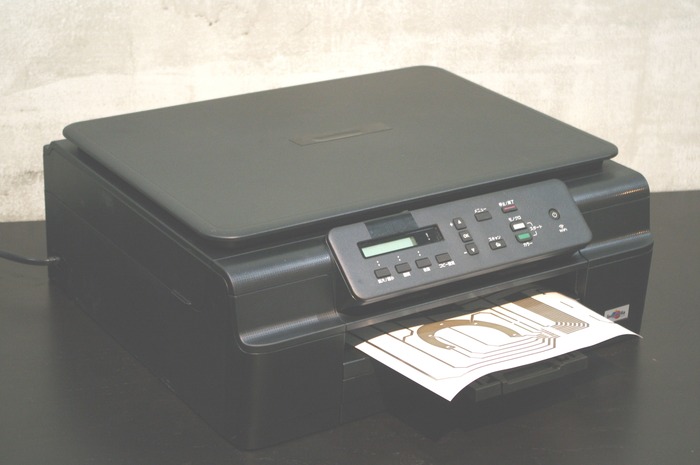
Want to do PCB!!!! JUST HAVE A PRINTER AND ITS DONE!!!
Friday, 18 April 2014
 Bring the fun of circuit design to everyone.
AgIC, named after Ag Inkjet Circuit, transforms home printers into circuit board manufacturing equipment.
Making circuits at home and office
 Recent advances in
material science have made it possible to manufacture magical conductive
ink. The ink contains tiny tiny silver particles whose size is less
than a hundred thousandth part of a sesame seed! The ink dries in a few
seconds and conductivity emerges instantly when the traces are drawn on
our photo inkjet printing paper. You can make circuits exactly as you
use a printer using ordinary ink at your home and office.
Recent advances in
material science have made it possible to manufacture magical conductive
ink. The ink contains tiny tiny silver particles whose size is less
than a hundred thousandth part of a sesame seed! The ink dries in a few
seconds and conductivity emerges instantly when the traces are drawn on
our photo inkjet printing paper. You can make circuits exactly as you
use a printer using ordinary ink at your home and office.No more breadboard
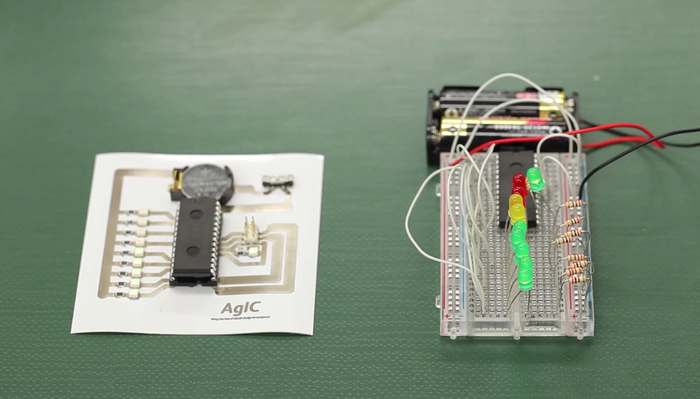 Breadboards look like faster way of
prototyping, but they can easily become messy. Circuit boards with AgIC
technology are much simpler and more beautiful alternatives. You can
replicate or revise your circuits as many times as you want.
Breadboards look like faster way of
prototyping, but they can easily become messy. Circuit boards with AgIC
technology are much simpler and more beautiful alternatives. You can
replicate or revise your circuits as many times as you want.Crisp and sharp traces
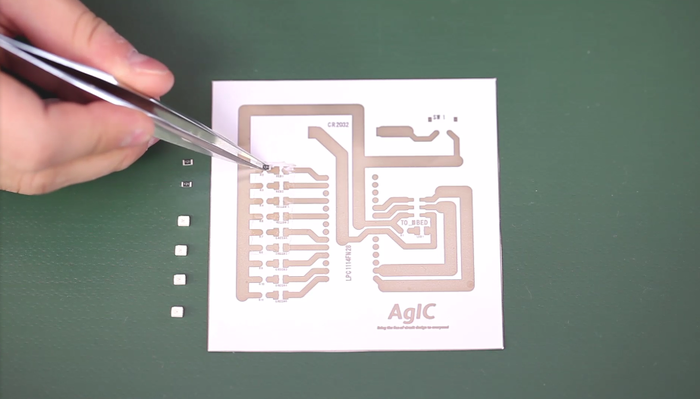 Home inkjet printers, which are
mass-produced commodities, have surprisingly high precision compared
with any other fab equipment available for the same price range.
Home inkjet printers, which are
mass-produced commodities, have surprisingly high precision compared
with any other fab equipment available for the same price range.
Circuit patterns you can create with AgIC print are as precise as anything you can print using an inkjet printer.
What you need follows HERE:
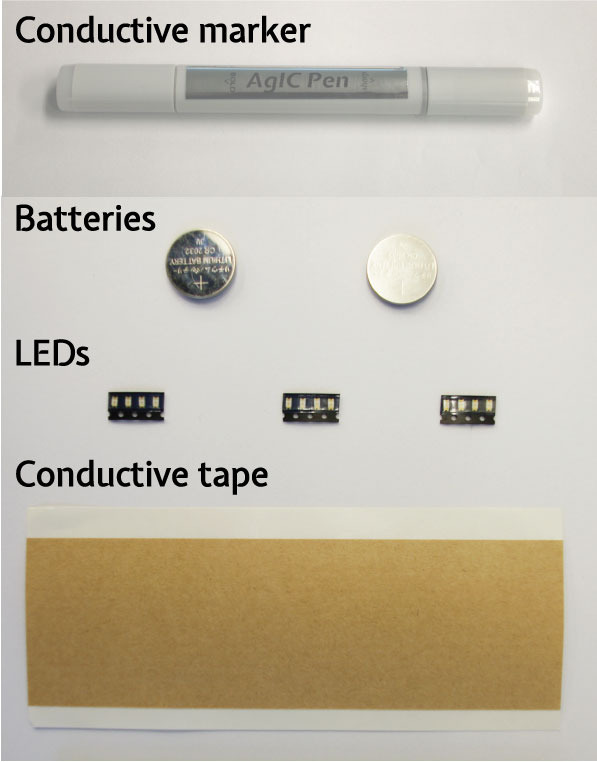
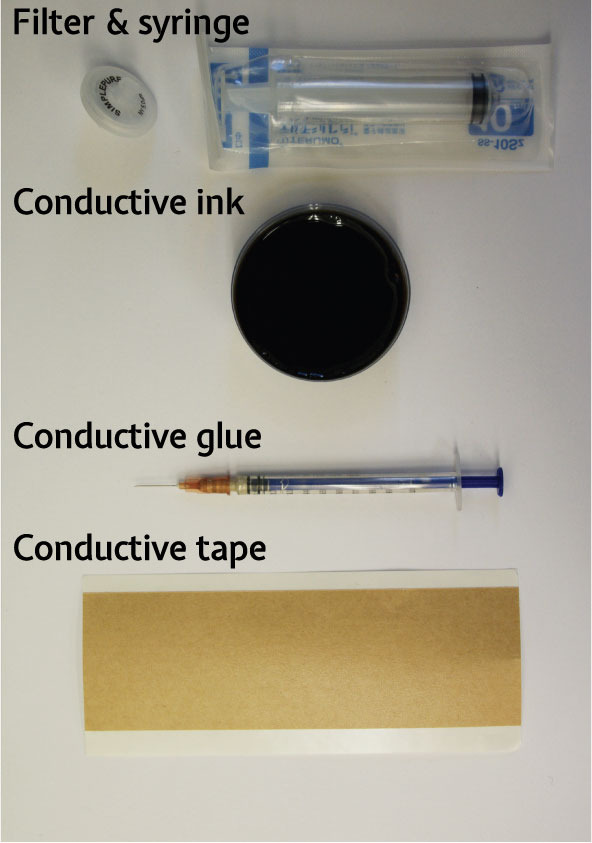
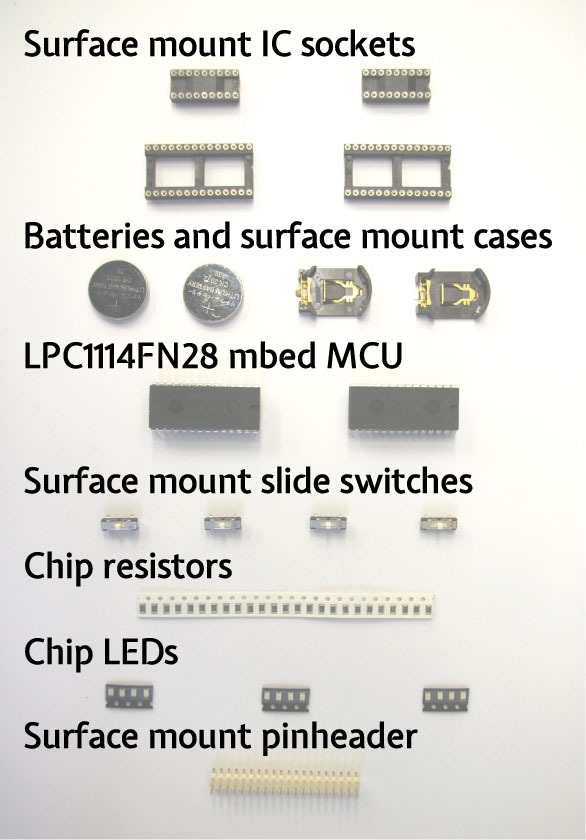
WANT TO KNOW HOW IT WORKS WATCH THE VIDEO
VISIT AgIC WEBSITE TO KNOW MORE ON THEIR PRODUCTS (Click Here)
VoIP - Revolution in Telephony??
Sunday, 6 April 2014

VoIP is Voice over Internet Protocol, which is a method of making your voice transmit over Internet. We are familiar with Skype and Google talk where we make free phone calls. VoIP can make standard internet connection turn into a free phone booth. VoIP is a revolutionary technology that has the potential to completely rework the world's phone systems.
VoIP use Analog Telephone Adapter (ATA), IP Phones and Normal Computer for making calls. VoIP phone users can make calls from anywhere there's a internet connection.
Your voice is sent in terms of Packets to destination via internet. VoIP technology uses the Internet's packet-switching capabilities to
provide phone service. VoIP has several advantages over circuit
switching. For example, packet switching allows several telephone calls
to occupy the amount of space occupied by only one in a circuit-switched
network.

HSpice Tutorial 10 - Some example Circuits and Netlist Codes
Saturday, 5 April 2014
Here are some Example Circuits and respective netlist codes for familiarizing with HSpice.
Example 2:
 EE105 SPICE Tutorial Example 2 - Simple Diode Circuit
.model tut_diode d (is=1e-14 vj=0.6 rs=10)
vs vs gnd 5V
rs vs vd 5k
d1 vd gnd tut_diode
.op
.end
Example 3: ( Different analysis for same circuit above)
EE105 SPICE Tutorial Example 3 - Simple Diode Circuit.model tut_diode d (is=1e-14 vj=0.6 rs=10)
vs vs gnd 5V
rs vs vd 5k
d1 vd gnd tut_diode
.dc vs 0V 5V 0.01V
.option post=2
.end
Example 4:
 EE105 SPICE Tutorial Example 4 - Simple RC High-Pass Filter
vs vs gnd ac 1V
c1 vs vo 1nF
r1 vo gnd 1k
.ac dec 500 100 1G
.option post=2
.end
Example 5:
 EE105 SPICE Tutorial Example 5 - Complicated Resistor Network
vs vs gnd 1V
r1 vs 1 1k
r2 1 2 500
r3 2 vo 800
r4 2 gnd 200
r5 1 4 1.5k
r6 4 vo 700
r7 vo 5 100
r8 5 gnd 900
.tf v(vo) vs
.end
Example 6(Pole Zero analysis for Exaample 4):
EE105 SPICE Tutorial Example 6 - Pole-zero analysis of a high-pass filtervs vs gnd ac 1V
c1 vs vo 1nF
r1 vo gnd 1k
.pz v(vo) vs
.end
Example 7:
EE105 SPICE Tutorial Example 7 - Computing rise timevs vs gnd PWL(0s 0V 5ms 0V 5.001ms 5V 10ms 5V)
r1 vs vo 1k
c1 vo gnd 1uF
.tran 0.01ms 10ms
.measure tran trise trig v(vo) val=0.5 rise=1 targ v(vo) val=4.5 rise=1
.end
Visit HSpice Tutorial Page(Click Here)
Subscribe to:
Posts (Atom)